

Category page SEO for manufacturers is where most factory websites leave the biggest opportunity on the table. Buyers who search “rubber gym flooring manufacturer”, “brass manifold supplier” or “silage film factory China” are usually not looking for one specific model yet. They want to see a supplier’s range, compare options and decide whether this factory is worth contacting. That is exactly the job of a category page. Yet on many manufacturer sites, category pages are nothing more than a grid of thumbnails with a heading, leaving both buyers and Google with very little to work with.
This guide explains how to turn product line pages into strong landing pages for sourcing searches. We cover how to choose the main keyword for each category, how to structure the page, how much text to write and where, how to present model comparisons, how to handle filters and pagination, and how category pages should link to products and guides. If you have already improved your product pages using our guide to product page SEO for manufacturers, category pages are the logical next step.
Table of Contents
Why Category Pages Matter So Much for Manufacturers
On a typical factory website, category pages sit at the center of the structure. The homepage links to them, they link to dozens of products, and buyer guides point to them. This position gives them more internal authority than individual product pages. They also match broader commercial queries with higher search volume, the kind of queries that bring new buyers who have never heard of your company.
Google’s documentation on helping Google understand site structure makes two points that apply directly to factories. First, Google uses links between pages to understand how a site is organized and which pages are most important. Second, category pages should link directly to the products you want indexed, because products only reachable through internal search may be missed. In other words, a weak category page hurts not only itself but every product beneath it.
There is a commercial reason too. Many buyers decide whether to contact a supplier based on the range they see. A category page that clearly shows models, sizes, materials and customization options signals capability. A bare grid signals a trader with a catalogue.
Step 1: Assign the Right Keyword to Each Category
Start from your keyword map. Each category page should own one main keyword cluster with sourcing intent, such as “gymnastics mat manufacturer” or “thermal actuator supplier”, plus close variants. Product pages beneath it target more specific terms, and buyer guides target questions and comparisons. If you have not built a map yet, our guide to keyword research for B2B exporters walks through the method.
Watch for categories that overlap. If “gym mats”, “exercise mats” and “fitness mats” exist as three separate categories with mostly the same products, they will compete with each other. Either merge them into one strong category or make the differences real, for example by separating commercial gymnastics mats from home exercise mats with distinct products and copy.
Step 2: Structure the Page Around Buyer Decisions
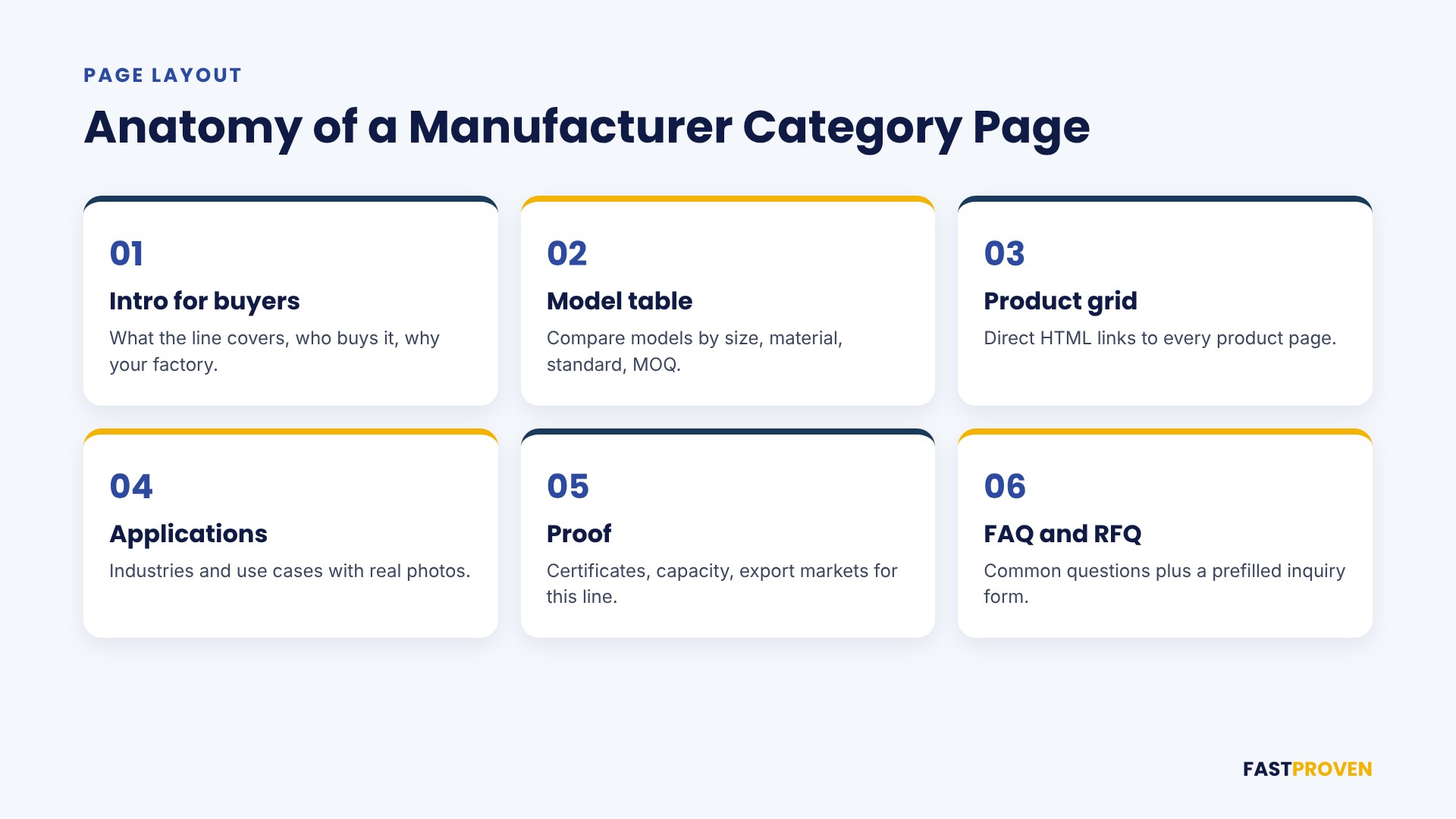
A strong manufacturer category page follows the order in which a buyer evaluates a product line. The layout below works across most industries, from sports equipment to HVAC components.
Buyer Focused Introduction
Open with 80 to 150 words above the product grid. State what the category covers, who typically buys it, and what makes your factory a credible source. Include the main keyword naturally in the first sentence or two. Keep it short at the top so buyers reach products quickly; the deeper content goes below the grid.
Model Comparison Table
Before or right after the product grid, add a table that compares key models or variants by the attributes buyers care about. This is often the most useful element on the page for engineers and purchasing managers, and it gives Google rich, relevant text.
Product Grid With Real Links
Show every product in the category with a real photo, the product name and one or two key attributes. Each item must be a normal HTML link to its product page. Avoid grids that load products only after clicking a JavaScript button.
Applications and Use Cases
Below the grid, explain where these products are used: industries, environments, typical projects. Real application photos help buyers picture the product in their context.
Proof for This Product Line
List certifications, test standards and production capacity that apply specifically to this category. Mention export markets if you can share them. Generic company claims belong on the About page; category pages need line specific proof.
FAQ and RFQ
End with three to six questions buyers ask about this line, such as MOQ, lead time, customization and samples, followed by an inquiry form prefilled with the category name.
Example: Model Comparison Table for a Category Page
Here is how a comparison table might look for a hypothetical category of PU foam gymnastics mats. The values are illustrative; the structure is what matters.
| Model | Thickness | Size Options | Cover Material | Typical Use | MOQ |
|---|---|---|---|---|---|
| Folding panel mat | 5 cm | 120 x 240 cm, custom | PU leather | Floor exercise, schools | 50 pcs |
| Landing mat | 20 cm | 200 x 300 cm, custom | PVC coated fabric | Vault and bar landings | 20 pcs |
| Crash mat | 30 to 40 cm | 200 x 300 cm, custom | PVC coated fabric | High impact training | 10 pcs |
| Incline wedge | Varies | Standard and custom | PU leather | Tumbling practice | 30 pcs |
Notice how the table lets a buyer narrow options in seconds. It also naturally includes terms like “landing mat”, “crash mat” and “PVC coated fabric” that people search for, without stuffing them into paragraphs.
Step 3: Write the Right Amount of Text in the Right Place
Category pages often fail at text in one of two ways. Some have none at all. Others have a thousand words of generic SEO copy pasted at the bottom that nobody reads and that says nothing specific. The better approach is purposeful text spread across the page: a short intro at the top, labels and attributes in the grid, an applications section, a proof section and an FAQ. Together this might reach 500 to 1,200 words, but every paragraph earns its place.
Write for a professional reader. Use specific language: materials, standards, tolerances, operating conditions, packaging options. Avoid empty phrases such as “high quality and competitive price”, which appear on thousands of supplier sites and tell buyers nothing.
Step 4: Handle Filters, Sorting and Pagination Carefully
Large categories often use filters for size, color or material and sorting by name or popularity. These features help buyers, but they can create hundreds of URL variations with nearly identical content. Google’s guidance flags faceted navigation as a common source of crawling problems.
For most factory websites, the safest approach is to keep the number of indexable filter pages small. Let filters work for users, but prevent unimportant combinations from being indexed, usually with canonical tags pointing to the main category or by keeping filter states out of crawlable links. If a particular filter combination matches real search demand, such as “20 cm landing mats”, consider giving it a proper subcategory page with its own text instead of relying on a filter URL.
For pagination, make sure every page in the series is reachable with normal links and that products on later pages are not orphaned. If a category has fewer than 40 or 50 products, showing them all on one page is often simpler.
Step 5: Link Categories Into the Rest of the Site
Category pages should receive links from the homepage and main navigation, from related categories, and from buyer guides that discuss the product type. In return, they should link to every product they contain and to the two or three most relevant guides. This creates a clear path for buyers moving from learning to comparing to inquiring.
Use descriptive anchor text in body links, such as “see our range of PU foam landing mats”, rather than “click here”. Keep the main navigation focused on your top categories; mega menus with hundreds of links dilute the signal and overwhelm buyers. Our blueprint for the B2B website for manufacturers shows how categories fit with the other core pages.
Before and After: A Typical Category Page Rewrite
| Element | Before | After |
|---|---|---|
| Heading | Products | PU Foam Gymnastics Mats Manufacturer |
| Introduction | None | 120 words on range, buyers and factory capability |
| Product grid | Thumbnails only | Photos, names, key specs, direct links |
| Comparison | None | Model table with thickness, size, material, MOQ |
| Applications | None | Schools, clubs, competition venues with photos |
| Proof | Generic logos | Relevant test standards and capacity for this line |
| Conversion | Contact page link in footer | FAQ plus prefilled RFQ form |
How to Measure Category Page Performance
Category pages deserve their own measurement routine, because they behave differently from product pages and articles. In Google Search Console, filter the performance report by each category URL and look at three things: which queries bring impressions, the average position for the main keyword cluster, and the click through rate. A category that appears for many relevant sourcing queries but sits on page two usually needs stronger content and more internal links. A category that ranks well but gets few clicks often needs a better title tag and meta description.
Then connect search data with behavior. Check how many visitors to each category move on to a product page, and how many inquiries mention products from that line. If buyers arrive but rarely click deeper, the grid may be confusing, the photos weak or the comparison table missing. If they click deeper but never inquire, the issue is probably on the product pages or in the RFQ path.
Review this quarterly for your top five categories. Over time, you will see which lines are gaining visibility, which need investment and which might be better merged. This simple habit turns category SEO from a one time rewrite into a steady improvement process.
When a Guide Ranks Instead of Your Category
Sometimes you will notice that a buyer guide on your site ranks for a keyword you intended for a category page. This is not always a problem. If the search results for that keyword are mostly guides and comparisons, Google may simply see the query as informational. In that case, keep the guide ranking and make sure it links clearly to the category. If, however, the results are mostly supplier and category pages, strengthen the category and adjust the guide so it targets a more question based angle.
Lessons From Manufacturer Projects
On a sports equipment factory website we rebuilt, the original category pages were attractive image galleries with almost no text. Buyers arriving from Google had to click into products one by one to understand the range. Rebuilding each product line as a full category page, with an introduction, specification tables, applications and real factory and shipping photos, gave the site pages that could actually compete for sourcing searches. On an HVAC component maker’s site, the main challenge was different: ten product lines with some overlapping categories. Clarifying which category owned which keyword, and linking products consistently, mattered more than adding new text.
We keep client names private and share results only in consultations with permission. The repeatable lesson is that category pages need to be treated as landing pages in their own right, not as navigation menus with pictures.
Common Category Page Mistakes
- Empty or near empty category pages. A heading and thumbnails give Google little reason to rank the page.
- Generic text blocks at the bottom. Long, vague copy written only for search engines rarely helps.
- Overlapping categories. Several categories targeting the same keyword compete with each other.
- Products not linked directly. JavaScript loading or search only access hides products from crawlers.
- Uncontrolled filter URLs. Thousands of indexable variations waste crawl effort and create duplicates.
- No conversion path. Buyers ready to ask a question have to hunt for the contact page.
Frequently Asked Questions
How much text should a manufacturer category page have?
Enough to help buyers choose. Typically a short introduction at the top plus applications, proof and FAQ sections below the grid, adding up to several hundred words of genuinely useful content.
Should I create subcategories?
Create subcategories when a group of products matches distinct search demand and buyer needs, such as a specific material or application. Avoid subcategories that only split a small range into tiny pages.
Can category pages rank better than product pages?
Often yes for broader sourcing searches, because they cover a range and receive more internal links. Product pages tend to rank for more specific, long tail queries.
Should category pages show prices?
Exact prices are rarely practical in B2B. MOQ, lead times and customization options are usually more helpful at the category level.
Conclusion: Treat Every Product Line as a Landing Page
Category page SEO for manufacturers means turning product line pages into complete answers for sourcing searches. Assign one keyword cluster per category, open with a buyer focused introduction, compare models in a clear table, link every product directly, show applications and line specific proof, and close with an FAQ and RFQ. Control filters and pagination so Google spends its effort on the pages that matter.
Your next step: pick your most important product line and open its category page next to the before and after table in this article. Count how many of the “after” elements it already has. Fill the gaps first on that page, then repeat for the next category. A strong category structure also makes technical work easier, as explained in our guide to technical SEO for manufacturer websites.
This article was last reviewed and updated by the Fastproven Editorial Team on November 21, 2026, to ensure the information is accurate and relevant for readers.