
Google Search Console for manufacturers is the most valuable free tool most factories never open after the day it was installed. It shows exactly which searches bring your website into Google results, which product pages buyers click, which pages Google refuses to index and which technical problems are quietly holding rankings back. For an export business that relies on overseas inquiries, that information is gold. Yet in many factory teams, nobody logs in, often because the reports look confusing or because Google services are hard to access from mainland China.
This guide explains how to set up Search Console properly, which reports matter most for manufacturers, how to read query data with a buyer’s mindset, how to find quick wins and how to build a simple monthly routine. It connects closely with our guide to technical SEO for manufacturer websites, because many technical problems first appear in Search Console.
Table of Contents
What Google Search Console Actually Tells You
According to Google’s own Search Console overview, the tool shows which queries bring users to your site, along with impressions, clicks and average position; lets you submit sitemaps and individual URLs and review index coverage; sends alerts when Google finds problems; provides a URL Inspection tool with crawl, index and serving details for individual pages; and reports on Core Web Vitals and structured data. Unlike third party SEO tools, the data comes from Google itself, which makes it especially reliable for niche B2B keywords that other tools barely track.
For manufacturers, this matters because many valuable sourcing queries have low reported search volume. A tool might claim that “20 cm PU landing mat supplier” gets zero searches per month, while Search Console shows your page appearing for it dozens of times. Those small numbers often represent real buyers with real projects.
Setting Up Search Console the Right Way
A correct setup avoids data gaps that can mislead you for months. Use the following checklist when you first configure Search Console, or when you audit an existing setup.
- Add a Domain property rather than only a URL prefix property, so data covers all versions of your site, including www and non www, HTTP and HTTPS.
- Verify ownership through DNS using your domain registrar or DNS provider. This is the most robust method.
- Use a company owned Google account as the owner, and add your agency or freelancer as a user, not as the only owner.
- Submit your XML sitemap and confirm that Google reads it successfully.
- Add key team members with appropriate permission levels, including someone outside mainland China if your internal team struggles with access.
- Turn on email notifications so critical issues reach someone who will act on them.
Ownership deserves emphasis. We regularly meet factories whose Search Console, analytics and even domain are controlled entirely by a former agency. When the relationship ends, years of data disappear. Always keep ownership in the company’s name.
The Performance Report: Reading Data Like a Buyer
The Performance report is where most insight lives. It shows queries, pages, countries, devices and dates, with four core metrics: clicks, impressions, average click through rate and average position. Reading it well is less about the numbers themselves and more about the buyer behavior behind them.
Queries Tell You What Buyers Call Your Products
Sort queries by impressions and read the top hundred carefully. You will often find vocabulary you never used on your site, regional variations, specifications and applications you had not considered. If buyers search “bale wrap” while your pages say “silage stretch film”, that is a signal to add the term naturally to relevant pages. Queries are a direct window into buyer language.
Pages Show Which Content Earns Visibility
Switch to the Pages tab to see which URLs receive impressions and clicks. For most manufacturers, a small number of category pages and a few articles drive most traffic. Check whether your most profitable product lines are among them. If a key category barely appears, it likely needs stronger content, better internal links or technical fixes.
Countries Show Whether You Reach Target Markets
Filter by country to see impressions and clicks from your priority export markets. A factory targeting Germany and Poland that receives most impressions from India and the Philippines may have content that is too general or vocabulary that matches other regions. Country data also helps when deciding whether to add a new language.
Click Through Rate Reveals Weak Titles
A page that appears often in results but receives few clicks has a snippet problem. Its title tag or meta description may be vague, may not match the query intent or may look less trustworthy than competitors. Rewriting titles to include the product type, a key attribute and a clear benefit often lifts clicks without any ranking change.
Finding Quick Wins in Search Console
Quick wins are changes that improve results within weeks rather than months. Search Console makes them easy to spot if you know where to look.
| Signal in Search Console | What It Usually Means | Action |
|---|---|---|
| High impressions, low CTR | Title or description does not attract clicks | Rewrite title and meta description around the query |
| Average position 8 to 20 | Page is close to page one | Add depth, examples, specs and internal links |
| Query with no matching page | Demand you are not serving | Create a dedicated guide or product section |
| Two URLs alternating for one query | Keyword cannibalization | Merge or differentiate the pages |
| Key page with falling clicks | Competitors improved or content aged | Refresh content, check technical issues |
| Impressions from wrong countries | Vocabulary or content targets other markets | Adjust terminology and examples for target buyers |
Positions eight to twenty deserve special attention. These pages already have Google’s attention but sit just outside the first page, where most clicks happen. Often a modest improvement, such as adding a comparison table, answering two more questions or linking from a strong category page, is enough to move them up.
The Page Indexing Report
The Page indexing report shows which URLs are indexed and why others are not. For manufacturers, focus on your money pages first. If important categories or products appear as “Crawled, currently not indexed”, Google found them but decided they were not worth storing, often because content is thin or very similar to other pages. “Discovered, currently not indexed” usually points to weak internal linking or crawl capacity problems. “Excluded by noindex tag” on pages that should rank is a configuration error to fix immediately.
Do not panic over every excluded URL. Search Console also lists tag archives, feed URLs, parameter variations and other pages that should not be indexed. The goal is not zero exclusions; it is that every page you care about is indexed.
URL Inspection: Your Diagnostic Tool
When a specific page underperforms, inspect it. URL Inspection shows whether the page is indexed, when Google last crawled it, which canonical URL Google selected and whether the page is mobile friendly. You can also test the live URL to see how Google renders it right now. After fixing an important page, use “Request indexing” to ask Google to recrawl it sooner, though this is a request rather than a guarantee.
Pay special attention to the “Google selected canonical” field. If Google chose a different URL than the one you intended, it may be treating your page as a duplicate. This is common when the same product appears in two categories or when tracking parameters create variations.
Experience and Enhancement Reports
The Core Web Vitals report groups URLs into good, needs improvement and poor based on real user data. For factory websites, mobile issues are most common, typically caused by large images, sliders and heavy page builders. The report lists example URLs, which helps your developer find patterns rather than fixing pages one by one.
If your site uses structured data, such as product or organization markup, the enhancement reports show errors and warnings. Fix errors that affect important pages, especially when markup does not match visible content, which can make pages ineligible for rich results.
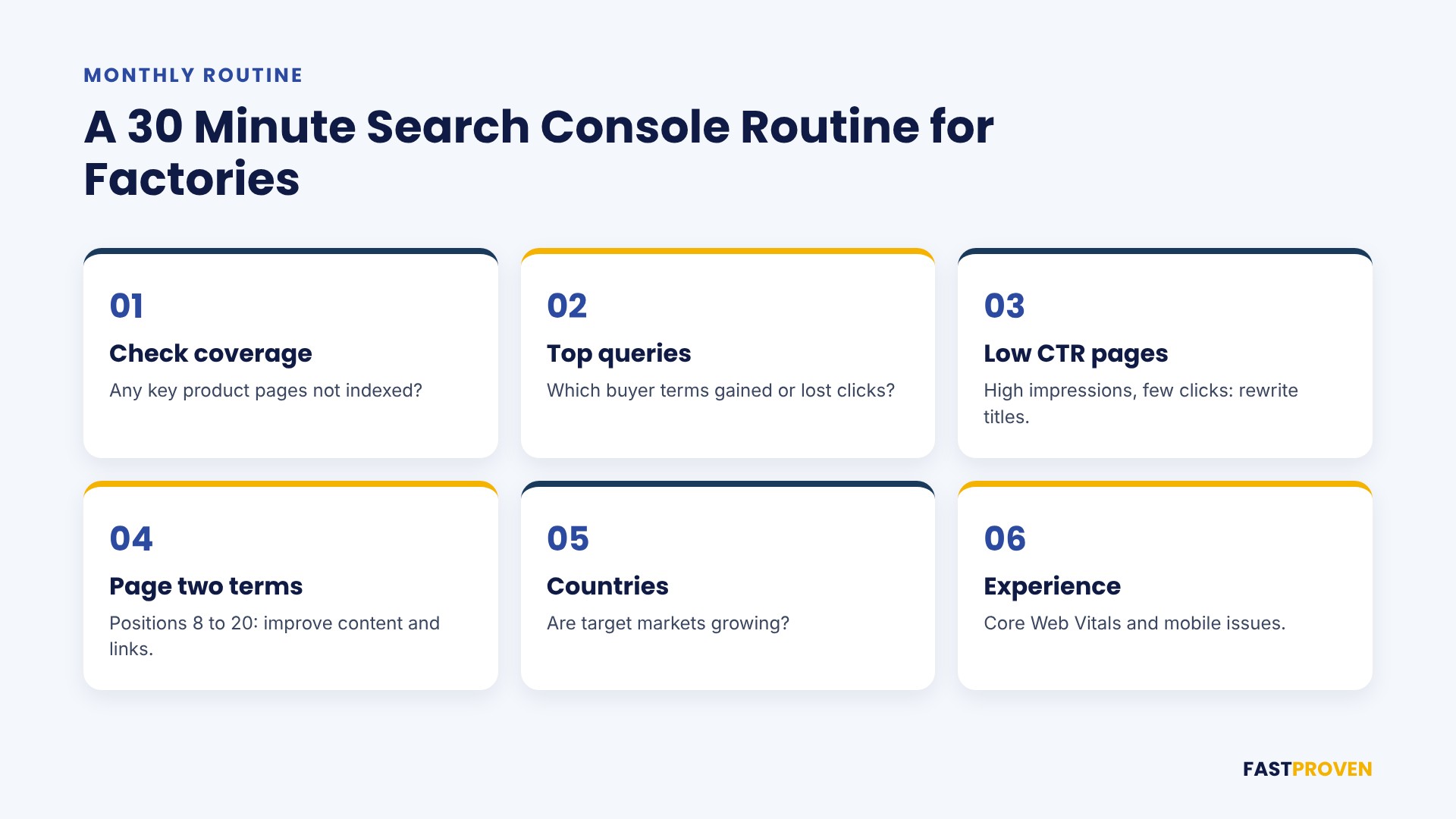
A Monthly 30 Minute Routine
You do not need to live inside Search Console. A focused monthly routine of about thirty minutes catches most opportunities and problems.
- Check Page indexing for new errors on key categories and products.
- Compare the last 28 days with the previous period for total clicks and impressions.
- Review the top queries that gained or lost clicks, and note new buyer vocabulary.
- Find pages with high impressions and low CTR, and add them to a title rewrite list.
- Find pages averaging positions 8 to 20 for valuable queries, and add them to an improvement list.
- Check impressions from priority countries.
- Glance at Core Web Vitals for new poor URLs on mobile.
Write the findings in a simple spreadsheet with three columns: issue, page, action. Over a few months, this becomes a clear record of what changed and what worked. It also feeds directly into your content plan; our article on content marketing for manufacturers explains how to turn query gaps into articles.
Connecting Search Console to Real Inquiries
Search Console tells you about visibility and clicks, not about orders. To connect search performance with business results, track the landing page of each inquiry. Many form plugins can record the page where the visitor started or submitted the form. Combine that with Search Console data and you can see which pages and queries lead to RFQs, not just traffic.
Ask your sales team to note the products and topics mentioned in each inquiry. Over time, patterns appear. You may discover that a modest guide article brings unusually qualified buyers, or that a high traffic page produces almost no inquiries because it attracts the wrong audience. Those insights shape where to invest next, alongside the keyword map described in our guide to keyword research for B2B exporters.
Access Tips for Teams in Mainland China
Because Google services are blocked domestically, factory teams in China often struggle to use Search Console consistently. Practical solutions include a stable company VPN for the marketing lead, granting access to a trusted overseas partner or agency who sends monthly summaries, and exporting key reports to shared spreadsheets. Whatever the solution, make sure someone is responsible for reviewing the data every month. Unused access is the same as no access.
What We Learn From Manufacturer Search Console Data
Search Console audits have been a turning point in several of our manufacturer projects, and we describe them without naming clients. For a high silica materials producer, a traffic analysis showed that most of a large decline came from topically unrelated content clusters, which led to a cleaner site structure focused on core product lines. For an HVAC component maker, Search Console data helped identify the timing of a traffic drop around a Google core update and separate it from technical issues. For an agricultural film producer, query data revealed overlapping articles competing for the same terms, which we consolidated.
In each case, the data was already there. It simply needed someone to read it with the right questions.
Frequently Asked Questions
Is Google Search Console free?
Yes. Search Console is free for any website owner who verifies ownership.
How long does it take for data to appear?
Performance data usually starts appearing within a few days after verification, and history builds from that point. Earlier data before verification is not available.
What is the difference between Search Console and Google Analytics?
Search Console shows how your site performs in Google Search before visitors arrive: queries, impressions, rankings and indexing. Analytics shows what visitors do on your site after they arrive.
Why does Search Console show different numbers than SEO tools?
Third party tools estimate data using their own crawlers and panels. Search Console reports Google’s own data for your site, so it is usually more accurate for your pages, especially for low volume B2B queries.
Conclusion: Let Google Tell You Where to Focus
Google Search Console for manufacturers turns guesswork into evidence. Set it up under company ownership, read queries as buyer language, use the performance report to find quick wins, check indexing for money pages, inspect underperforming URLs and run a short routine every month. Connect what you learn with inquiry data, and Search Console becomes the compass for your SEO and content decisions.
Your next step: log in today, open the Performance report for the last three months and filter for your most important category page. Note its top queries, average position and CTR. That single view usually reveals your first improvement, whether it is a better title, missing content or a technical fix covered in our guide to category page SEO for manufacturers.
This article was last reviewed and updated by the Fastproven Editorial Team on November 23, 2026, to ensure the information is accurate and relevant for readers.