
Image SEO for product photos is one of the most overlooked opportunities for manufacturers. Buyers sourcing physical products are visual by nature. Before they read a single specification, they want to see the material, the stitching, the finish, the packaging and the product in use. Many of them search Google Images directly, scrolling through pictures of “PU gymnastics mats” or “brass underfloor heating manifold” and clicking on the supplier whose photos look most convincing. If your images are generic, badly named or invisible to Google, that visual search traffic goes to someone else.
This guide explains how factories can turn product photography into a search asset. We cover what to shoot, how to name and size files, how to write alt text that helps rather than spams, where to place images on the page, which formats to use and the technical details that decide whether Google can index your images at all. It works alongside our guide to product page SEO for manufacturers, because images and product content succeed together.
Table of Contents
Why Image SEO Matters for Manufacturers
For many B2B product categories, images do much of the selling. A crisp close up of a weld, a cross section of foam layers or a photo of mats stacked on a pallet answers questions that text struggles to answer. Good images also keep buyers on your page longer, encourage them to explore more products and make your company look like a real manufacturer rather than a trading company with borrowed pictures.
From a search perspective, images bring traffic in three ways. They can rank in Google Images on their own. They can appear in image packs within regular search results. And they strengthen the page they sit on, because relevant, original images are part of what makes a product page genuinely useful. Google’s image SEO best practices make the basics clear: use standard HTML image elements, write useful alt text without keyword stuffing, and provide context so Google understands what each image shows.
Start With Real Photos From Your Factory
No optimization technique can rescue stock photos or images copied from other suppliers. Experienced buyers recognize generic pictures, and duplicated images offer Google nothing new. The foundation of image SEO for manufacturers is original photography that shows your actual products and capabilities.
A useful shot list for each product line includes a clean studio photo of the full product, close ups of critical details such as materials, joints, threads or surface finish, the product in a realistic application, packaging and labeling, products during production or inspection, and loading or shipping photos. Not every product needs all of these, but your most important lines should have them. These images also feed your category pages, catalogues, trade show materials and sales emails, so one photo session serves many purposes.
Photography Tips That Make a Difference
You do not need a professional studio for every product, but consistency matters. Use a neutral background for catalogue shots, consistent lighting, and the same angles across similar products so buyers can compare. Shoot detail photos with enough sharpness that buyers can zoom in. Include a scale reference where size matters, such as a ruler, a hand or a standard object. For in use photos, show the product in a realistic environment rather than a staged setting that looks artificial.
Name Files Descriptively Before Uploading
File names are a small but real signal. A file named IMG_4021.jpg says nothing; a file named pu-gymnastics-landing-mat-20cm-blue.jpg tells Google and anyone downloading the image exactly what it shows. Rename files before uploading them to your website, using lowercase words separated by hyphens. Keep names descriptive but concise, and avoid stuffing them with every keyword you can think of.
| Poor File Name | Better File Name | Why |
|---|---|---|
| IMG_4021.jpg | pu-gymnastics-landing-mat-20cm.jpg | Describes product and key attribute |
| product1-final-new.png | brass-manifold-8-port-flow-meter.jpg | Specific and meaningful |
| 微信图片_2026.jpg | silage-stretch-film-750mm-roll.jpg | English, readable, searchable |
| best-cheap-mat-china-factory-wholesale.jpg | folding-panel-mat-4-fold-packaging.jpg | Avoids keyword stuffing, describes the photo |
Write Alt Text That Describes, Not Spams
Alt text is the written description of an image, used by screen readers for visually impaired users and by search engines to understand the image. Good alt text describes what the image shows, in context, in natural language. Google’s guidance specifically warns that stuffing alt text with keywords can make a site look spammy.
A simple test helps: if you read the alt text aloud to someone who cannot see the image, would they understand what it shows? For example, “Blue PU gymnastics landing mat, 20 cm thick, with reinforced handles on the side” is helpful. “Gym mat gym mats China gym mat factory best gym mat” is not. Include the product type and key attributes naturally when they are visible in the image, and describe what makes this particular photo different from the others on the page.
Alt Text and Title Attributes
Some content teams also add a title attribute to images, which can appear as a tooltip when users hover. If you use it, make it complementary to the alt text rather than a copy. Alt text describes the image; a title can add a short note, such as the context or the benefit. Alt text is the more important of the two for accessibility and search.
Balance Resolution and File Size
Manufacturers face a genuine tension here. Buyers want high resolution images to inspect details, but large files slow pages down, especially on mobile networks overseas. The solution is not to shrink images until details disappear. It is to serve images efficiently.
- Keep master files at full resolution in your archive, and never downscale originals destructively.
- Export web versions at a size that matches how they are displayed, with a larger version available for zoom or lightbox views.
- Use modern formats such as WebP, which usually produce smaller files than JPEG at similar visual quality.
- Compress carefully, checking that fine details like texture and stitching remain clear.
- Use responsive images so phones receive smaller versions and large screens receive larger ones. Most modern CMS platforms, including WordPress, generate these automatically.
- Lazy load images below the fold so the first view of the page loads quickly.
Image weight is one of the most common reasons manufacturer pages fail Core Web Vitals. Our guide to technical SEO for manufacturer websites explains how speed fits into the wider technical picture.
Place Images Where They Add Meaning
Google uses the text around an image to understand what it shows. An image placed next to the specification table it illustrates, with a caption explaining what the buyer is looking at, carries more meaning than the same image floating in a gallery with no context. On product pages, put the main product photo near the heading, detail photos near the relevant specifications and application photos near the use case section.
Captions are underused on factory websites. A short caption such as “Cross section showing 3 layer foam construction with high density top layer” helps buyers understand the image quickly and gives Google additional context. You do not need captions on every image, but they are valuable for technical and detail photos.
Make Sure Google Can Index Your Images
Several technical choices can make images invisible to search engines, even when they look fine to visitors.
- Use HTML img elements. Google does not index images set only as CSS backgrounds.
- Avoid images loaded only by complex scripts that may not render reliably for crawlers.
- Do not block image folders in robots.txt.
- Use stable URLs for images; avoid regenerating file names each time the site rebuilds.
- Include important images in sitemaps if your platform supports image sitemaps or includes images in regular sitemaps.
- Set a representative image for each page through metadata such as og:image, which helps when pages are shared and gives a clear preferred image.
Sliders and gallery plugins deserve special attention. Some load images in ways that hide them from crawlers or delay them until a user interacts. Test important product pages with Search Console’s URL Inspection tool to see what Google renders.
Factory Videos and Their Thumbnails
Many manufacturers now have short videos of production lines, quality tests or loading. Video is persuasive, but it follows similar rules to images when it comes to search. A video embedded on a page with no surrounding text, no descriptive title and a random thumbnail is easy for Google to overlook. A video placed beside the content it illustrates, with a clear title, a short description and a meaningful thumbnail, is far more useful to buyers and search engines alike.
Choose thumbnails that show something specific, such as a machine in action or a close up of a test, rather than a company logo. Add a short text summary near the video explaining what it shows and why it matters for the buyer, for example “Drop test of a 20 cm landing mat at 1.5 meters, showing rebound and surface recovery.” If you host videos on YouTube and embed them, use descriptive titles and descriptions there too, because YouTube itself is a search engine that some buyers use for supplier research.
Keep video files from slowing down your pages. Avoid autoplaying large background videos on the homepage, which often hurt load times on mobile. A poster image with a play button gives buyers the choice and keeps the page fast. For process pages and category pages, one strong video plus a set of still photos is usually more effective than several long videos that few people finish.
Images on Category Pages
Category pages need images that help buyers scan a product line quickly. Use consistent thumbnail styles so products are easy to compare, and link each thumbnail to its product page with descriptive anchor text nearby. Add one or two application or factory photos to the category introduction to show context. Our guide to category page SEO for manufacturers covers how images fit into the full page structure.
Lessons From Manufacturer Photo Projects
In our work with Chinese factories, image handling has repeatedly made a visible difference. On a sports equipment manufacturer’s site, the client supplied real factory videos and loading photos for export shipments, which became some of the most persuasive elements on category pages because they showed capability no competitor could copy. On other projects, we found product pages loading slowly because original camera files several megabytes in size had been uploaded directly. Converting to efficient formats while keeping full native resolution for zoom solved the speed issue without making photos look worse.
We keep client names private and only share specific outcomes with permission. The consistent lesson is that real, well organized photography is a competitive advantage for factories, and image SEO simply makes sure that advantage is visible in search.
Common Image SEO Mistakes on Factory Websites
- Using stock or copied photos instead of original factory images.
- Uploading files with camera or chat app names such as IMG_ or WeChat image names.
- Leaving alt text empty or filling it with keyword lists.
- Uploading huge originals that slow pages dramatically.
- Over compressing until details buyers care about are lost.
- Embedding text in images, such as spec tables as pictures, which Google cannot read well.
- Using background images for products, which are not indexed.
Frequently Asked Questions
Does Google Images really bring B2B buyers?
For visual product categories, yes. Buyers often browse image results to shortlist suppliers whose products look right, then click through to the website. The traffic volume may be smaller than web search, but it can be highly relevant.
What is the best image format for product photos?
WebP is a strong default for web display because it balances quality and file size well. Keep high resolution originals in your archive for catalogues, print and future use.
How many images should a product page have?
Enough to show the product clearly from the angles buyers care about, typically four to eight for an important product, including details, packaging and application.
Should we watermark product photos?
A small, subtle watermark can discourage copying, but large watermarks across the product make images less useful and less attractive. Many manufacturers prefer clean images and rely on original file names, metadata and consistent style instead.
Conclusion: Let Your Factory Be Seen
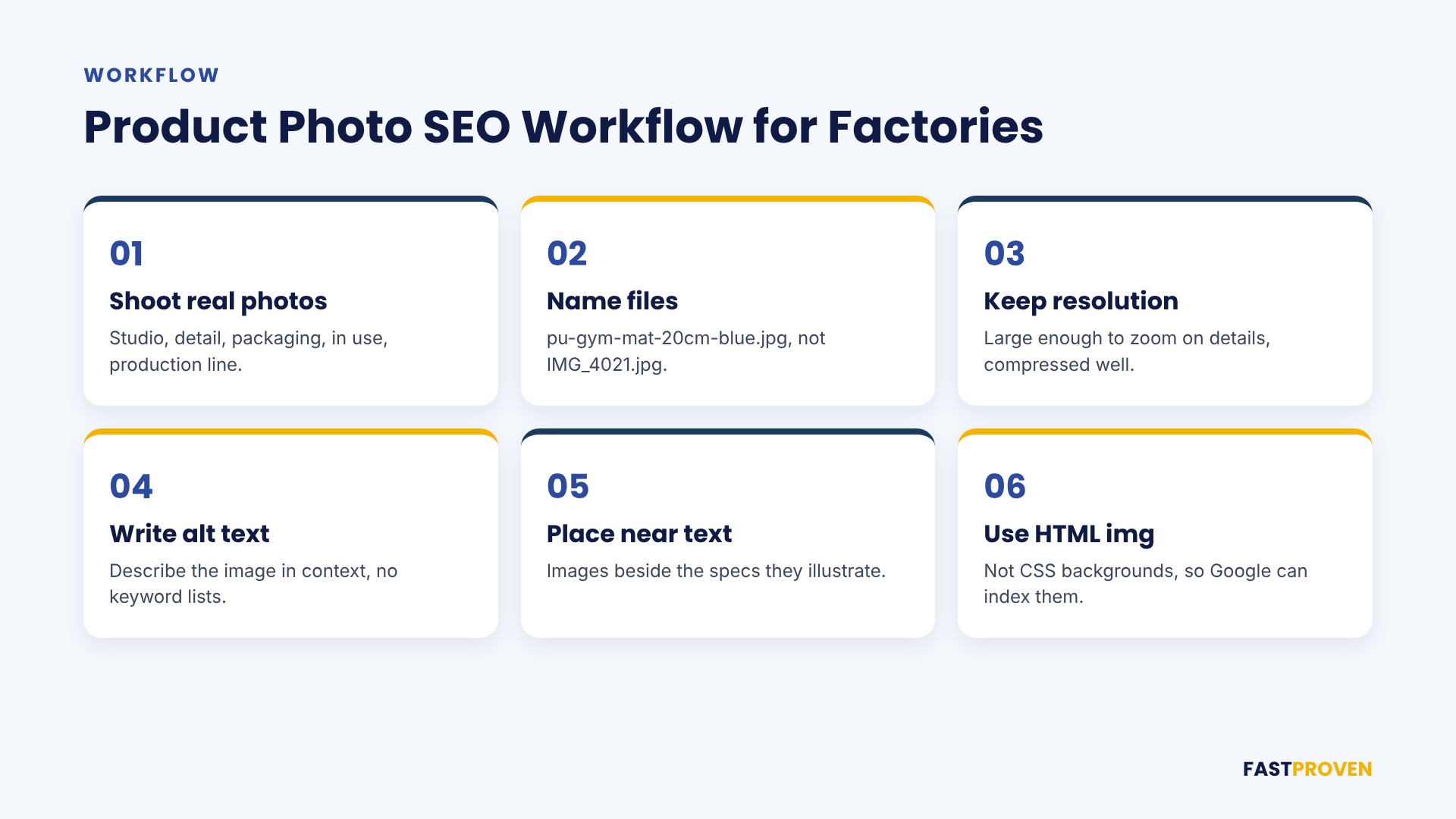
Image SEO for product photos turns something every manufacturer already has, its own products and production floor, into a search advantage. Shoot real photos with a clear shot list, name files descriptively, write alt text that describes rather than stuffs, keep resolution high while serving efficient files, place images near the content they illustrate and make sure Google can index them.
Your next step: open your best selling product page, right click each image and check its file name, alt text and file size. If you find camera file names, empty alt text or multi megabyte images, fix that page first, then roll the same standard across your catalogue. A faster site also benefits from the right server setup, which we cover in our guide to website hosting for Chinese exporters.
This article was last reviewed and updated by the Fastproven Editorial Team on November 23, 2026, to ensure the information is accurate and relevant for readers.