
Technical SEO for manufacturer websites is the part of search optimization that nobody sees until something breaks. Buyers never notice a clean sitemap or a correct canonical tag. They only notice when a product page loads for eight seconds on their phone, or when the page they were promised in a Google result turns out to be a 404. Google notices much more than that, and on factory websites we audit, technical problems are often the quiet reason why good content never ranks.
This guide turns technical SEO into a practical checklist written for export managers and the developers or agencies they work with. We cover how Google finds and indexes your pages, how site structure affects rankings, what speed targets actually matter, how to handle duplicates and redirects, and which issues are specific to factories based in China. It sits under our broader guide to Google SEO for Chinese manufacturers, which explains how technical work fits with keywords, content and trust.
Table of Contents
What Technical SEO Means for a Factory Website
Technical SEO is everything that helps search engines discover, crawl, understand and serve your pages. Google’s own crawling and indexing documentation describes this as a pipeline: Google first finds a URL, then fetches it, then decides whether to store it in its index, and only then can the page appear in results. A failure at any stage means your content, however good, is invisible.
For manufacturers, the pipeline usually breaks in predictable places. Product pages hidden behind JavaScript filters never get discovered. Hundreds of variant URLs with almost identical content dilute each other. A theme change accidentally applies a noindex tag to whole sections. Servers far from buyers make pages slow enough that people leave before the RFQ button loads. None of these problems require advanced engineering to fix, but they do require someone to look.
The good news is that most factory sites have relatively simple structures compared with large ecommerce stores. A few dozen categories, a few hundred products and some articles are very manageable. That means a focused technical review, done once properly and then checked monthly, usually removes most of the risk.
Step 1: Make Every Important Page Discoverable
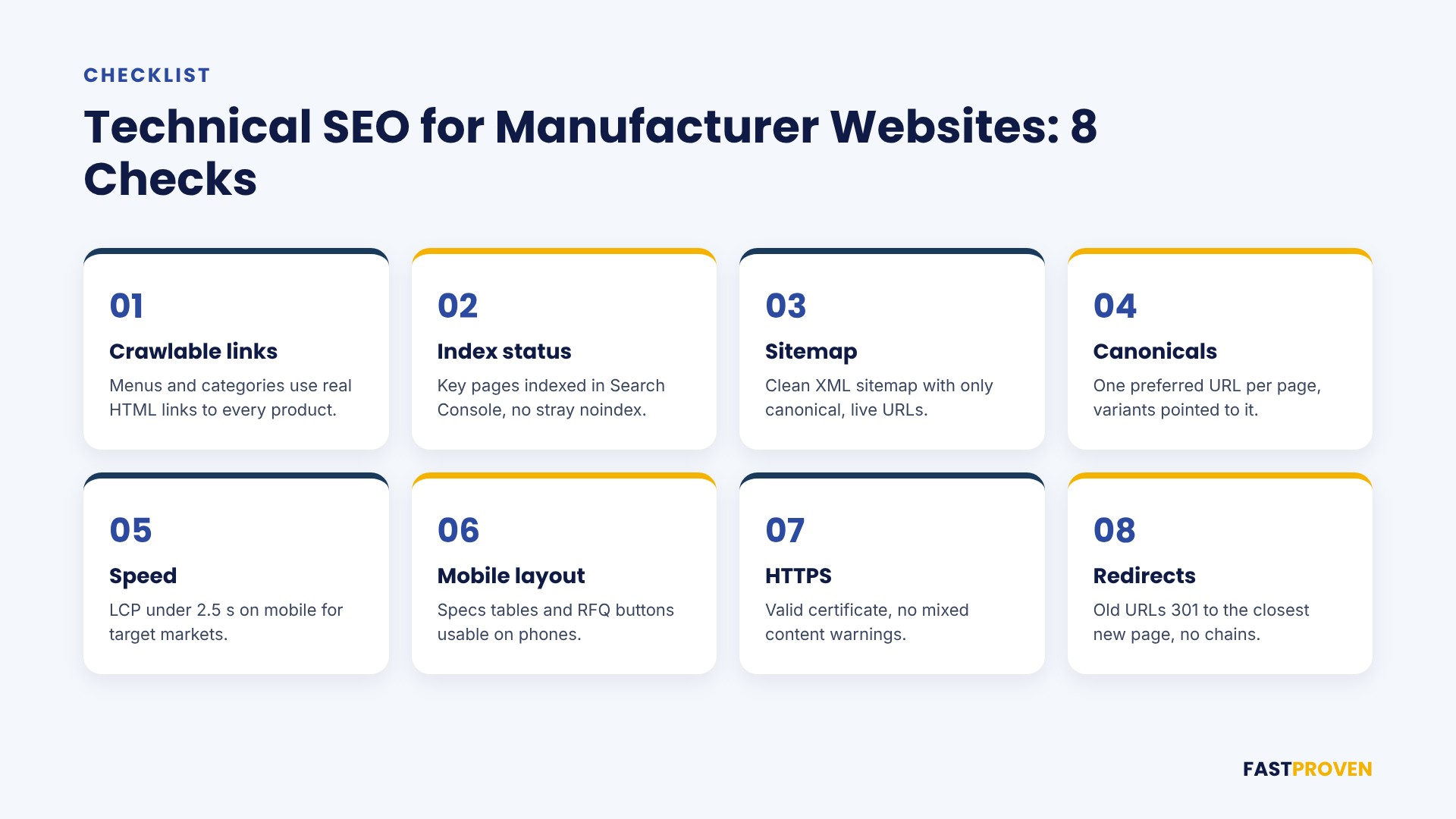
Google discovers pages mainly by following links. If a product page is only reachable through an internal search box or a dropdown that loads results with JavaScript, Google may never find it. The safest structure is boring and reliable: the main menu links to category pages, category pages link directly to every product with normal HTML links, and important articles link to the products they discuss.
Check your site the way a crawler would. Use a crawling tool such as Screaming Frog, Sitebulb or a similar audit tool, start from the homepage and see how many of your product URLs it finds. If your catalogue has 300 products and the crawler finds 120, the gap is your first job. Common causes include pagination that only works with buttons, filters that rewrite the page without changing the URL, and products assigned to no category at all.
XML Sitemaps as a Backup, Not a Substitute
An XML sitemap lists the URLs you want indexed and helps Google find pages faster, especially on new sites. Keep it clean: only canonical, live, indexable URLs, no redirects, no 404s, no pages marked noindex. Submit it in Google Search Console and check the reported count against the number of pages you actually care about. Remember that a sitemap tells Google a page exists, but strong internal links tell Google the page matters.
Step 2: Confirm What Google Has Actually Indexed
The page indexing report in Search Console shows which URLs are indexed and why others are not. Look first at your money pages: main categories and best selling products. For any that are missing, use the URL Inspection tool to see whether Google crawled the page, what it found and whether it chose another URL as canonical. This one report often explains months of disappointing rankings.
Typical reasons we see on manufacturer sites include “Crawled, currently not indexed”, which often signals thin or duplicate content; “Duplicate without user-selected canonical”, common with product variants; “Excluded by noindex tag”, usually a leftover from staging; and “Page with redirect”, which is fine for old URLs but a problem when menus still link to redirected addresses.
| Index Status | Common Cause on Factory Sites | Typical Fix |
|---|---|---|
| Excluded by noindex | Staging setting left on, or a plugin rule applied to a whole post type | Remove noindex from pages that should rank, recrawl |
| Crawled, currently not indexed | Thin product text, near duplicate variants | Merge variants, add specs and unique descriptions |
| Duplicate, Google chose different canonical | Same content on several URLs with parameters | Set canonical tags, link internally to one version |
| Discovered, currently not indexed | Weak internal linking, slow server | Link from categories, improve server response |
| Not found (404) | Deleted products still linked from menus or other pages | Redirect to closest page, update links |
Step 3: Build a Clear Site Structure
A logical hierarchy helps buyers and search engines in the same way. For most factories, three levels are enough: homepage, product category, product. Supporting content such as buyer guides sits in a blog or resources section and links into categories and products. Keep URLs readable in English, for example /gymnastics-mats/folding-panel-mat/, and avoid random IDs or Chinese pinyin that buyers cannot read.
Internal links carry most of the structural signal. Link from the homepage to your most important categories, from categories to products, and from guides to the products they mention. Use descriptive anchor text such as “PU foam landing mats” rather than “click here”. If you want a deeper explanation of how page types should work together, our article on the B2B website for manufacturers lays out the full page blueprint.
Step 4: Handle Duplicates With Canonicals
Duplicate content is not a penalty in itself, but it forces Google to choose which version to show, and it does not always choose the one you want. Factory sites create duplicates in several ways: the same product listed in two categories with different URLs, tracking parameters, print versions, HTTP and HTTPS versions, or versions with and without “www”.
Pick one preferred URL for each page and make everything point to it. Set a self-referencing canonical tag on the preferred version, add canonical tags on variants pointing to it, redirect alternate hostnames to one version, and make sure internal links use the preferred URL. Most WordPress SEO plugins handle self canonicals automatically, but they cannot fix structural duplication caused by how products are organized. That decision belongs in the content plan.
Step 5: Meet Realistic Speed Targets
Speed matters for buyers first and rankings second. Google’s Core Web Vitals give three practical targets: Largest Contentful Paint within 2.5 seconds, Interaction to Next Paint of 200 milliseconds or less, and Cumulative Layout Shift of 0.1 or less, measured at the 75th percentile of real visits. You do not need perfect scores, but you do need pages that feel fast for buyers in your target markets.
On manufacturer sites, the usual speed problems are oversized product photos, autoplay video backgrounds on the homepage, heavy page builders, too many plugins and servers located far from buyers. Fixes are equally predictable: compress and resize images without dropping below the resolution buyers need for zooming, replace background video with a poster image and a play button, cache pages, and serve content through a CDN close to your markets.
Mobile Usability for B2B
B2B buyers do browse on phones, especially during trade shows, travel and evening research. Check that specification tables scroll horizontally instead of breaking the layout, that RFQ buttons are visible without zooming, and that forms are easy to complete on a small screen. A table that overflows the screen or a form field hidden under a chat widget quietly costs inquiries.
Step 6: Manage Redirects and Broken Links
Factories update catalogues often. Products are discontinued, renamed or merged, and every change can leave broken links behind. When a product page is removed, redirect it with a 301 to the closest relevant page, usually the successor model or its category. Avoid redirecting everything to the homepage, which frustrates buyers and wastes the old page’s signals.
Watch for redirect chains, where URL A redirects to B, which redirects to C. Each hop slows the page and weakens signals. Update internal links to point directly at final URLs. Run a crawl every quarter to catch new 404s and chains before they pile up.
Technical Issues Specific to Factories in China
Teams based in mainland China face a few extra technical considerations. Google services are not accessible domestically without a VPN, so the person responsible for Search Console needs reliable access. Some Chinese CDN and analytics scripts slow pages for overseas visitors, and some fonts or libraries loaded from Chinese servers may load slowly abroad. Hosting location also matters: a server in the mainland is fast for domestic visitors but often slower for buyers in Europe or the Americas, and it requires ICP filing.
We also see sites built by local developers using templates designed primarily for Baidu, with page titles in Chinese, meta tags missing and English text embedded in images. These sites can look fine to the factory team but are close to invisible for Google. If your website was built mainly for domestic search, budget for a proper English rebuild rather than patching.
A Monthly Technical SEO Routine
Technical SEO is not a one time project. A short monthly routine catches most issues early. In our own work with manufacturer clients, this is the checklist we run before looking at content or keywords.
- Open Search Console and check the page indexing report for new errors on categories and products.
- Review the Core Web Vitals report for new poor URLs on mobile.
- Inspect two or three key product pages with the URL Inspection tool.
- Check that the sitemap was read recently and that the URL count looks right.
- Crawl the site and review new 404s, redirect chains and pages without internal links.
- Test the RFQ form from a phone, including the confirmation message.
- Confirm SSL validity and that no mixed content warnings appear.
This routine takes about an hour once you are used to it. When something looks wrong, it is far easier to fix a problem from last month than one that has been growing for a year. For product level details such as structured data and specification tables, see our guide to product page SEO for manufacturers.
What We Usually Find in Factory Website Audits
Across manufacturer projects in sports equipment, HVAC components, agricultural films and industrial materials, the same technical findings appear repeatedly. We keep client names private, but the patterns are worth sharing. Catalogues where only part of the products were linked from categories. Large image files uploaded straight from cameras. Duplicate product pages created when a range was copied into a new category. Old URLs from a previous website that were never redirected, which meant years of accumulated links pointed to error pages.
None of these issues was dramatic on its own. Together, they meant Google crawled the wrong pages, indexed fewer products than expected and spread signals thinly. Fixing them did not require a new website. It required a structured audit, a prioritized list and a few weeks of careful work.
Frequently Asked Questions
Do I need a developer for technical SEO?
Some fixes, such as server configuration, template changes or redirect rules, are easier with a developer. Many others, like updating sitemaps, removing noindex tags or improving internal links, can be done by a marketing team using a CMS such as WordPress.
How often should a manufacturer run a technical audit?
A full audit once or twice a year is sensible, with a short monthly check in Search Console. Always audit before and after a redesign or migration.
Is page speed more important than content?
No. Content relevance remains the main ranking factor, but slow pages lose buyers and can hold back otherwise strong pages. Treat speed as a requirement, not a strategy.
Will technical fixes alone improve rankings?
They often help, especially if important pages were not indexed. But technical work mainly removes barriers. Rankings grow when good content and trust signals sit on a technically healthy site.
Conclusion: Fix the Pipes Before Adding More Water
Technical SEO for manufacturer websites is about making sure Google can find, read and trust every page you invest in. Discoverable links, a clean index, clear structure, controlled duplicates, realistic speed and tidy redirects form the foundation. Without them, new content flows into leaking pipes.
Your next step: open Search Console today, check how many of your product and category pages are indexed, and compare that number with your catalogue. If the gap is large, start there before commissioning new articles. If you would like a structured technical review of your factory website, the Fastproven team runs audits for exporters and can share a prioritized fix list. You can reach us through the Fastproven homepage.
This article was last reviewed and updated by the Fastproven Editorial Team on November 20, 2026, to ensure the information is accurate and relevant for readers.