

Product page SEO for manufacturers is where search traffic finally meets a buying decision. A buyer who searches “1 inch brass manifold 6 port supplier” or “PU foam crash mat 20 cm” is not browsing for inspiration. They have a specification in mind, a project or order in progress and usually a short list of suppliers to contact. If your product page appears for that search and answers their questions clearly, there is a good chance the next step is an RFQ. If the page is a photo, a model number and a button, they go back to the results and click someone else.
This guide breaks down how to build product pages that rank on Google and convert serious B2B buyers. We cover keyword targeting, page structure, specification tables, images, structured data, FAQs and RFQ blocks, then show a worked example and the mistakes we see most often in factory catalogues. It fits into the wider framework from our guide to Google SEO for Chinese manufacturers and the page blueprint in our article on the B2B website for manufacturers.
Table of Contents
Why Product Pages Matter More Than You Think
In many manufacturer websites we audit, product pages are treated as a catalogue export: dozens or hundreds of entries generated from a spreadsheet, each with a model number, two photos and a few bullet points. That approach is efficient for the team that builds the site, but it leaves Google with very little to work with and leaves buyers with too many unanswered questions.
Product pages matter for three reasons. They capture long tail searches that include specific sizes, materials and standards, which are often the most commercially valuable queries. They provide the detail engineers and quality managers need before approving a supplier. And they are often the page a buyer shares internally when recommending you to colleagues. A strong product page works as a search landing page, a technical document and a sales tool at the same time.
Step 1: Choose the Right Keyword for Each Product Page
Start by deciding what each product page should rank for. Combine the product type, one or two defining attributes and, where relevant, a B2B intent word. Examples include “thermal actuator 230V normally closed”, “silage stretch film 750 mm”, “PU gymnastics landing mat” or “OEM yoga mat manufacturer”. Avoid targeting only the internal model number, because buyers who do not know you yet will not search for it.
Check whether the product deserves its own page at all. If ten products differ only by color or length, a single page with a variant table usually performs better than ten nearly identical pages. One strong page concentrates relevance and links; ten thin pages split them and risk competing with each other. This is one of the most common structural fixes we make on factory sites.
Step 2: Structure the Page Around Buyer Questions
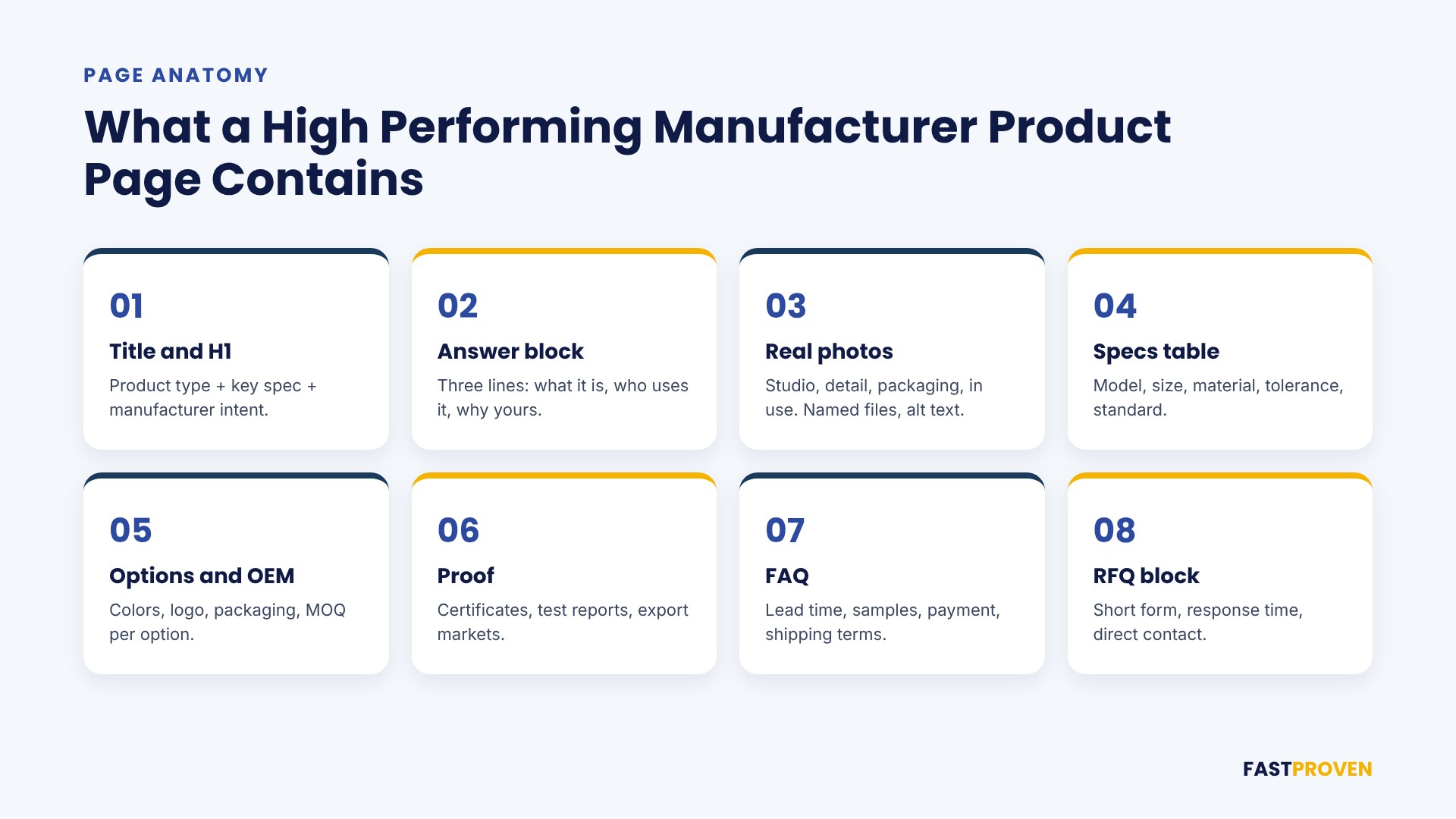
A good manufacturer product page answers questions in the order a buyer asks them. What is this product? Does it match my specification? Can it be customized? Is it certified? How fast can I get it, and how do I ask for a quote? The anatomy below follows that order.
Title Tag and H1
The title tag appears in Google results; the H1 is the main heading on the page. Both should include the product type and key attribute in natural English, for example “PU Foam Gymnastics Landing Mat, 20 cm Thick, Custom Sizes”. Add the brand or company name at the end of the title tag if space allows. Avoid stuffing words like “best”, “cheap” and “high quality” together, which looks spammy and does not help.
Answer Block Under the Heading
Right under the H1, write two or three sentences that explain what the product is, who uses it and what makes your version worth considering. This short block often becomes the snippet Google shows and helps buyers decide within seconds whether to keep reading.
Real Product Photos
Use photos taken at your factory: the full product, close ups of material and stitching or machining, packaging and the product in use. Name image files descriptively, such as pu-gymnastics-landing-mat-20cm.jpg, and write alt text that describes the image accurately. Compress images so pages load quickly on mobile networks abroad, but keep resolution high enough for buyers to zoom in on details.
Specification Table
The spec table is the heart of a B2B product page. Include every attribute a buyer would compare: dimensions, materials, tolerances, weight, standards, operating conditions and packaging. Use a real HTML table rather than an image, so Google can read it and buyers can copy values into their own documents.
Options, OEM and MOQ
Explain what can be customized: colors, logos, sizes, packaging, materials. State MOQ per option where it differs. Buyers who need private label or custom work want to know immediately whether you can do it and at what volume.
Proof: Certificates and Test Results
List the certificates and test reports that apply to this specific product, with issuer and date, and link to the documents. Mention the markets this product is already exported to if you can share that. Specific proof beats generic claims every time.
Product FAQ
Add three to five questions buyers actually ask your sales team: lead time, sample policy, payment terms, shipping terms, warranty, installation. These answers save emails, build trust and often match long tail searches.
RFQ Block
Place an inquiry button near the top and a short inquiry form at the bottom. Prefill the product name. State your typical response time. Show a direct email or messaging contact for buyers who prefer not to use forms.
Worked Example: A Specification Table That Helps Buyers Decide
Here is an example of how a specification table might look for a hypothetical underfloor heating manifold. The values are illustrative, but the structure is what matters: every row answers a question a buyer would otherwise have to email about.
| Specification | Value |
|---|---|
| Product | Brass underfloor heating manifold with flow meters |
| Ports | 2 to 12 circuits |
| Main connection | 1 inch |
| Circuit connection | 3/4 inch Eurocone |
| Material | Hot forged brass, nickel plated option |
| Max working pressure | 6 bar |
| Max working temperature | 70 degrees Celsius |
| Actuator compatibility | M30 x 1.5 thermal actuators |
| Options | Logo engraving, custom packaging, pre assembled with actuators |
| MOQ and lead time | Typical MOQ 100 sets, 25 to 35 days after deposit |
Compare that with a page that only says “High quality brass manifold, various sizes, contact us for details”. The first gives engineers what they need and gives Google many relevant terms; the second gives neither. If you want to see how we approach product category content for HVAC topics, our overview of HVAC manufacturers in China shows the kind of buyer oriented framing that also works on product pages.
Step 3: Add Structured Data the Right Way
Structured data is code that helps Google understand page content. For product pages, Google documents two main types in its product structured data guidelines: product snippets, intended for pages where people cannot buy directly, and merchant listings, intended for pages where customers can purchase on the site. Most B2B manufacturer pages that collect inquiries rather than online orders fall into the product snippet category.
In practice, that means marking up the product name, description, images, brand and, where genuine, reviews or ratings. Do not add fake ratings or prices that do not reflect reality; Google’s guidelines are clear that markup must match visible content. Many WordPress SEO plugins can generate basic product markup, but it is worth checking the output with Google’s Rich Results Test after publishing.
Step 4: Connect Product Pages to the Rest of the Site
Product pages rarely rank well in isolation. Link each product page to its parent category, to related products and to buyer guides that explain the product type. Link from guides and category pages back to the most important products. This internal linking tells Google which pages matter and helps buyers move naturally from learning to comparing to inquiring.
On the commercial side, think about how buyers arrive. Some land on a product page directly from Google; others come from your homepage or from marketplace profiles. If you also sell through platforms, our comparison of Alibaba vs independent website strategies explains why your own product pages should always be richer than your marketplace listings.
Before and After: What a Rewrite Typically Changes
| Element | Typical Catalogue Page | SEO Ready Product Page |
|---|---|---|
| Title | Model BL-2031 | PU Gymnastics Landing Mat 20 cm, Custom Sizes |
| Intro | None or one generic line | Two to three sentences on use, buyer type and advantage |
| Photos | One render with white background | Real factory photos, details, packaging, in use |
| Specs | Image of a brochure table | HTML table with all comparable attributes |
| Customization | “OEM available” | Options listed with MOQ per option |
| Proof | Logos without context | Named certificates and downloadable reports |
| Next step | Contact page link in footer | RFQ button near top, prefilled form at bottom |
Lessons From Rewriting Manufacturer Catalogues
When we worked with an HVAC component maker in Zhejiang, the product range covered valves, actuators, thermostats, manifolds, pipes and more. Many product pages had been created quickly, with similar text reused across items. We rebuilt the key product pages around specification tables and clear use cases, kept discontinued or deprioritized models out of the spotlight at the client’s request, and added a consistent reviewer footer so technical content was signed by a named person at the company. For a sports equipment factory in Shandong, the main change was replacing image only descriptions with real text and tables, plus photos from the production floor.
We keep client names and figures private by default and only discuss results in consultations with permission. The repeatable lesson is that product pages improve fastest when the factory supplies accurate technical data and real photos. Copywriting can make good information readable, but it cannot replace information that is missing.
Pre Publish Checklist for Every Product Page
When a team publishes dozens of product pages, small omissions creep in. A short checklist, used every time someone adds or updates a product, keeps quality consistent. We recommend printing it or adding it to the content brief so writers, designers and the person uploading to WordPress all check the same points.
- The title tag and H1 describe the product type and key attribute in buyer language, not only the model number.
- The first paragraph explains what the product is, who uses it and why your version is worth considering.
- At least four real photos are uploaded, compressed, named descriptively and given accurate alt text.
- The specification table is real HTML text and includes units for every value.
- Customization options and MOQ are stated, even if only as typical ranges.
- Certificates listed on the page actually apply to this product and are current.
- The page links to its parent category, two or three related products and at least one relevant guide.
- The inquiry button is visible without scrolling on a phone, and the form prefills the product name.
- Structured data, if used, matches what is visible on the page and passes a rich results test.
This checklist takes a few minutes per page. Compared with the cost of attracting a buyer to a page that then fails to answer a basic question, it is one of the cheapest improvements a factory marketing team can make.
Common Product Page Mistakes
- Duplicate descriptions across variants. Consolidate or write genuinely different content for each page.
- Specs only in images or PDFs. Keep the PDF for download, but publish the key data as text.
- Machine translated product names. Use the terms buyers in your target market actually search.
- No customization or MOQ information. Buyers assume the worst or skip you.
- Heavy, unoptimized images. Slow pages lose mobile visitors before they see your specs.
- Fake reviews or inflated claims in markup. This risks manual actions and damages trust.
Frequently Asked Questions
How long should a manufacturer product page be?
Long enough to answer buyer questions. For many industrial products, 300 to 800 words of useful text plus a specification table and FAQ is a reasonable range. Length without substance does not help.
Should every model have its own product page?
Only when models differ in ways buyers search for. Size or color variants usually work better as a table on one page.
Do product pages need prices to rank?
No. Many B2B product pages rank well without prices. Clear MOQ, lead time and customization information are usually more important for buyers at the inquiry stage.
Which structured data type should a factory use?
If buyers cannot purchase directly on the page, product snippet markup is generally the appropriate choice. Always keep markup consistent with what is visible on the page.
Conclusion: Treat Each Product Page as a Sales Conversation
Product page SEO for manufacturers is about turning catalogue entries into complete answers. Target realistic buyer keywords, structure the page around buyer questions, publish real photos and full specifications, show proof, add a short FAQ and make the RFQ easy. Do this well for your most important products and you will often see more qualified inquiries than from adding hundreds of thin pages.
Your next step: choose the five products that bring the most profit, open each product page and compare it against the anatomy in this guide. Write down what is missing, gather the data and photos from your production team, and rewrite those five first. If you would like a second pair of eyes on your catalogue, the Fastproven team can review it and suggest a prioritized plan.
This article was last reviewed and updated by the Fastproven Editorial Team on November 19, 2026, to ensure the information is accurate and relevant for readers.